Weather Radar: Tornado & Storm
- 4.4
- Rating
- 5.00M
- Installs
- Free
- Price
 Analysis by App-foxy
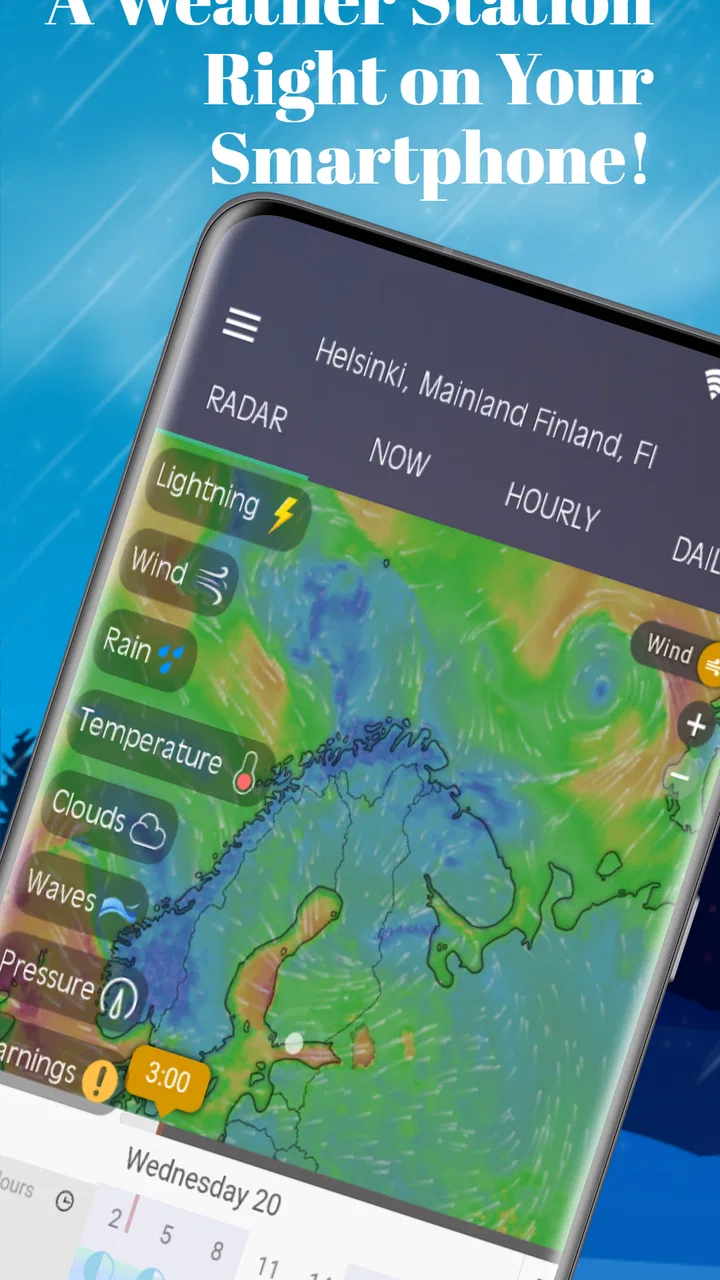
I often check the weather for one simple reason: I need to know whether the next hour will ruin a plan. A general forecast can tell me that rain is expected today, but it is less useful when I am deciding whether to leave now, wait ten minutes, or take a different route. Weather Radar: Live Storm Map is built around that more immediate problem. Instead of making me rely only on a daily icon, it puts live radar, storm movement, alerts, and local forecasts in the same weather-focused app.
After using it as a practical weather radar app, I found its strongest quality is not that it replaces every other weather service. Its value is that it helps answer a very specific question: “What is happening near me right now, and what may reach me soon?” That makes it more useful during unsettled weather than a basic forecast widget, while still keeping ordinary day-to-day planning fairly approachable.
Turning a vague forecast into a useful decision
The app comes from The Weather Radar and is free to use, with optional in-app purchases ranging from $0.99 to $19.99 per item. It belongs to the weather category, carries an Everyone age rating, and has built a sizeable audience, with over five million installs. Its average rating is 4.4 from around 156 thousand ratings, alongside roughly 7.4 thousand written reviews. Those figures do not guarantee that every user will enjoy it, but they do suggest that the radar-first approach has found a broad audience.
You May Also Like

 Blood Strike: 2.5 Anniversary
Blood Strike’s Loadouts Turn Every Drop Into a Tactical Gamble
A close look at Blood Strike’s custom loadouts: how fast access to signature weapons reshapes its battle royale rhythm, rewards preparation, and narrows the gap between fights.

 Pandora - Music & Podcasts
Pandora’s Music Is Easy to Start, but Harder to Recover
Pandora’s strength is its low-effort path from a seed to a station. Its weak spot is how much confidence it asks you to place in connection, setup, and quiet recovery.

 8 Ball Pool
 Is Built on Rivalries, Rematches, and Routine
A close look at the rivalries, rematches, shared routines, and unanswered safety questions that turn a quick pool match into a persistent mobile community.

 Samsung Music
’s Quiet Strength Is Playing What You Already Own
Its reach comes less from spectacle than from dependable access to a personal library. That simplicity is both the app’s strongest retention engine and its ceiling.

 AccuWeather: Weather Radar
AccuWeather Review: A Quick, Clear Forecast for Everyday Decisions
For everyday plans, the best forecast is the one you can understand quickly. AccuWeather makes rain timing, radar, and local conditions easy to act on, with a few trade-offs.

 Hill Climb Racing
Why Hill Climb Racing Still Turns Crashes Into One More Run
A tiny car, a bumpy hill and one more upgrade: Hill Climb Racing keeps resurfacing because its simple chaos makes every near-miss feel personal.
More From Our News Desk



What I appreciate is the way the app changes the kind of decision I make. A standard forecast may tell me there is a chance of rain in the afternoon. A radar view gives me a visual sense of whether precipitation is already nearby, whether it is moving toward my area, and whether a short delay could make a difference. That distinction matters when I am walking, cycling, driving, working outdoors, or trying to decide whether washing will stay outside.
The app is not just for dramatic storms. Its usefulness often appears in ordinary situations where weather is inconvenient rather than dangerous. A passing shower can be more important to a person waiting for a bus than a broad daily forecast suggests. A storm alert can also make a difference when I am planning a school pickup or deciding whether to start a long drive. The radar gives the forecast a sense of timing that a simple temperature-and-rain summary often lacks.
What I look at first
When I open the app, I start with the radar rather than reading every forecast detail. The map gives me a quick visual overview, while the local forecast helps put that picture into context. I then check whether the weather pattern is close enough to affect my plans or merely visible in the wider area. This two-step habit is more reliable for short-term decisions than repeatedly refreshing a weather icon.
The NOAA radar focus is especially relevant for people who want storm information rather than only general conditions. It gives the app a more serious purpose than a decorative forecast screen. At the same time, I would not treat any radar image as a promise about exactly what will happen at my front door. Weather systems change, coverage varies by location, and a visual pattern still needs sensible interpretation.
A useful setup is to allow the app to become part of a routine instead of opening it randomly. I would choose a location, check the current map, and then look at alerts before leaving for an outdoor activity. If I am planning something several hours away, I would use the local forecast for the broad plan and return to the radar closer to departure. That avoids the common mistake of treating an early forecast as fixed.
Why the first check takes less effort
The app reduces the amount of mental translation required. With a text forecast, I have to imagine where rain is located and how quickly it might arrive. With a live map, I can see the relationship between my area and the weather around it. That is a small interface advantage, but it saves time when I am already in a hurry.
Alerts add another layer for people who do not want to monitor the map continuously. I see them as a safety net, not as a replacement for judgement. If I am outside for a long period, I still prefer to check the radar manually because an alert may arrive after conditions have already changed or may cover a wider region than my exact route.
One practical tip is to compare the map with what I can see outside before making a major decision. If the sky is already changing, the radar helps explain the wider movement. If conditions look calm, I use the map to decide whether that calm is likely to last. This is a better workflow than taking either the screen or the window as the complete truth.
How it fits into everyday use
I find this app most useful when weather is part of a decision rather than a passing curiosity: whether to leave, change plans, or check on an outdoor task. A practical habit is to look at the wider radar picture first, then narrow your attention to the area that matters, so a nearby shower does not look more threatening—or less relevant—than it is. That routine also helps clarify where its everyday strengths end and where a simpler forecast may be enough.
A commute interrupted by a narrow rain band
Imagine I am about to walk home and notice rain on the forecast. I open the radar and see a band approaching from nearby. Rather than automatically waiting for an hour, I can judge whether the system looks like a brief interruption or part of a larger area of bad weather. If the map suggests a short gap, I may leave immediately. If the activity is expanding, I can delay the trip or choose transport.
This is where the app feels more useful than a conventional daily forecast. The question is not simply whether it will rain today. The question is whether rain is likely to affect the next part of my journey. A radar view is better suited to that decision because it provides location and movement as visual context.
Planning outdoor work without constant guesswork
For gardening, photography, sports, deliveries, or other outdoor tasks, I would use the app in stages. First, I would check the local forecast while planning the day. Then, shortly before starting, I would inspect the radar for nearby precipitation and review any relevant alert. Finally, I would check again if the task lasts long enough for conditions to change.
This workflow prevents two opposite mistakes. The first is cancelling too early because of a broad rain symbol. The second is starting confidently because the current sky looks clear, only to be caught by a system already moving in. The app does not remove uncertainty, but it makes the uncertainty easier to manage.
Storm awareness at home
During a storm, I find the combination of radar and alerts more useful than a simple temperature display. The map helps me understand whether the weather is moving toward my area or away from it, while alerts draw attention to conditions that may deserve a closer look. I would still rely on official emergency guidance for serious situations, but the app can serve as a convenient way to stay oriented.
That distinction is important. A consumer weather app is helpful for awareness and planning, but it should not be treated as the sole authority during dangerous weather. If an official warning or local instruction conflicts with my interpretation of the map, I would follow the official guidance. The app is best used as an accessible layer of information, not as an emergency command system.
Travel decisions and changing conditions
For a short trip, I use the map to inspect both the starting point and the surrounding area. This is more useful than checking only the weather at my destination because the difficult part of a journey may be somewhere between the two. The radar can reveal whether a route is likely to encounter a moving area of precipitation, although it cannot replace traffic information or a full travel forecast.
For longer travel, I would be more cautious about overvaluing the live view. Radar is naturally strongest for near-term awareness. A broader forecast is still more appropriate for deciding what to pack or whether an event several days away is sensible. This is one of the clearest trade-offs in the app: it is excellent when timing and location matter immediately, but less decisive when the plan is distant.
Small habits that make the app more useful
I found three habits particularly worthwhile. First, I check the radar before leaving rather than waiting for a notification to tell me something is already happening. Second, I use the forecast and radar together instead of asking one screen to answer every question. Third, I look for trends across more than one check. A single snapshot can be misleading, while repeated views show whether a system is approaching, fading, or holding its position.
Another useful habit is to avoid zooming in so closely that the wider pattern disappears. A local map can show what is overhead, but the broader view often explains why conditions are changing. I also avoid assuming that a clear space on the map guarantees dry weather at every street. Weather radar is a guide to precipitation patterns, not a street-by-street guarantee.
Where it removes friction compared with usual alternatives
Many people already use a phone’s built-in weather panel or a general forecast service. Those options are convenient for the temperature, daily outlook, and a quick glance at rain chances. I would choose them when I only need a simple answer, such as whether to wear a coat or how warm the afternoon may be.
Weather Radar: Live Storm Map becomes more compelling when the ordinary answer is too broad. Its focus on live radar and storm awareness means I spend less time switching between a forecast page, a separate radar website, and an alert source. Keeping those weather tasks together is the main convenience, especially when I am making a decision under time pressure.
The trade-off is that a radar-centered interface can feel more involved than a minimal weather widget. If I only want the current temperature, the map may be more information than I need. People who prefer a very quiet, glanceable interface may find a basic built-in forecast less distracting. I would not install this app simply to replace a clock-style temperature display.
The current version is 11.1.9, and the app supports devices running Android 7.1 or later. That makes it accessible to people using older Android hardware, although the experience will naturally depend on the phone’s screen, performance, and connection. I would also remember that live weather information is most useful when the app can refresh its map and alerts; anyone with unreliable connectivity should avoid depending on it as the only source during a trip.
Who should use it, and who should skip it
I would recommend it to people who regularly make short-term outdoor decisions, live in areas with quickly changing weather, or want a visual way to follow storms. It is also a good fit for users who find a rain percentage too abstract and would rather see where precipitation is located in relation to them.
I would be less enthusiastic for someone who wants only a simple daily forecast with no interest in radar. That person may get a faster answer from the phone’s default weather tool. I would also suggest caution for anyone expecting perfect minute-by-minute certainty. The app can improve awareness, but it cannot make rapidly changing weather completely predictable.
The optional purchases may also affect how each person evaluates the app. Since the core app is free, I can try the radar-centered workflow before deciding whether any extra paid elements are worthwhile. I would not pay automatically just because an app offers more weather information. I would first use the free experience for the situations that matter to me and judge whether the additional convenience genuinely saves time.
My final view after using it
Weather Radar: Live Storm Map solves a recurring problem well: it turns “Will the weather affect me soon?” into a question I can investigate visually instead of guessing from a general forecast. The app is most valuable when I need timing, location, and storm awareness in one place. Its radar-first design saves effort during commutes, outdoor work, short trips, and unsettled weather at home.
It is not the best choice for every weather task. A basic forecast remains quicker for simple temperature checks, and official warnings should take priority during serious conditions. The radar can also tempt users into false precision if they treat every colored area as an exact prediction for one street. Used sensibly, however, it gives me more context than a standard weather icon and helps me make better short-term decisions.
My recommendation is straightforward: install it if you often need to decide whether to leave now, wait, change routes, or keep watching the sky. Start with the free version, build a habit of checking the radar alongside the local forecast, and use alerts as a backup rather than your only warning. The real strength is time saved at the moment a forecast becomes a decision.
FAQs for Weather Radar: Tornado & Storm
01What features does Weather Radar: Live Storm Map offer?
Weather Radar: Live Storm Map provides real-time weather updates, interactive radar maps, storm tracking, and severe weather alerts. Users can customize notifications for specific weather conditions and access detailed forecasts. The app also offers satellite imagery and temperature overlays, making it a comprehensive tool for weather enthusiasts.
02How accurate is the weather data in Weather Radar: Live Storm Map?
The app integrates data from multiple reliable sources, including national weather services and meteorological agencies, to provide accurate and up-to-date information. While no weather app can guarantee 100% accuracy, Weather Radar: Live Storm Map is known for its precise tracking and timely alerts, helping users stay informed.
03Is Weather Radar: Live Storm Map free to use?
Weather Radar: Live Storm Map offers both free and premium versions. The free version includes basic features like radar maps and daily forecasts. The premium version, available through a subscription, unlocks additional features such as advanced storm tracking, ad-free experience, and more detailed weather insights.
04Can I customize alerts in Weather Radar: Live Storm Map?
Yes, the app allows users to set custom alerts for various weather conditions, such as thunderstorms, rain, and severe weather warnings. You can choose which types of alerts you receive and adjust the frequency of notifications, ensuring you only get the information that's most relevant to you.
05Which devices support Weather Radar: Live Storm Map?
Weather Radar: Live Storm Map is available for both Android and iOS devices. It supports a wide range of smartphones and tablets, ensuring compatibility with most modern devices. Users can download the app from Google Play Store for Android or the Apple App Store for iOS devices.
Pros
- Real-time storm tracking feature
- Detailed weather forecasts available
- User-friendly interface design
- Customizable alerts for severe weather
- Global coverage for travelers
Cons
- Ads can be intrusive at times
- Requires internet connection
- Limited features in free version
- Battery consumption is relatively high
- Occasional delays in live updates

Weather Radar: Tornado & Storm
Gallery